Performance Marketer, Digital Marketing Consultant & Trainer from Calicut, Kerala

ShabeerDig_Adm

Steps to add Admin to a Facebook business page 2024

Steps to add Admin to a Facebook business page


Using a computer:

  • Log in to your Facebook account.
  • Go to your Facebook page. You can find it in your list of pages or by searching for its name.
  • Click on “Settings” in the top menu.
  • Select “Page Roles” from the left-hand menu.
  • Under “Assign a New Page Role,” enter the name or email address of the Facebook profile you want to add as an admin.
  • Choose “Admin” from the dropdown menu next to their name.
  • Click “Add” to send the invitation.
  • The person you invited will receive a notification to accept the admin role.\


Using the Facebook app:

  • Open the Facebook app on your phone.
  • Select the menu button (three horizontal lines) at the bottom right corner.
  • Select the page you want to add an admin to.
  • Tap the menu button again at the bottom right corner.
  • Scroll down and select “Professional dashboard.”
  • Under “Tools,” select “Page Access.”
  • Next to “People with Facebook access,” select “Add New.”
  • Search for the person you want to add as an admin and select them.
  • Once you select the person, scroll down and toggle on “Allow this person to also have full control.”
  • Confirm by selecting “Give Access.”
  • Enter your Facebook password and select “Confirm.”

How to add a manager or owner to a Google Business Profile

Here are the steps how to add a manager or owner to a Google Business Profile:

1. Access your Business Profile:

2. Choose the location (if applicable):

  • If you manage multiple locations, select the specific location you want to grant access to.

3. Open the user management settings:

  • In the top right corner of your Business Profile, click the three dots.
  • A menu will appear. Select “Business profile settings” and then “People and access.”

4. Invite a manager or owner:

  • Click the “Add” button in the top left corner.
  • Enter the email address of the person you want to add.
  • Choose their access level: “Owner” or “Manager.”
    • Owner has full control over the profile, including adding/removing managers and transferring ownership.
    • Manager can manage most aspects of the profile but has fewer permissions than an owner.
  • Click “Invite” to send the invitation.

5. The invitee receives an email:

  • The person you invited will receive an email notification with instructions to join the Business Profile.

Additional notes:

  • You can change the access level of existing managers or owners later by following the same steps and selecting a different role.
  • Only the primary owner can transfer ownership of the Business Profile to another user.
Best video search engines 2024

The 10 Best Video Search Engines in 2024

In our online world, video search engines are like magical guides helping us find the videos we want to watch. But have you ever wondered why they’re so important?

Well, let’s break it down in simple terms. Imagine the internet is a huge library, and videos are the books. Now, without a search engine, finding the right book would be like trying to find a needle in a haystack! That’s where video search engines come in handy.

Video search engines can understand what we type into the search bar and show us videos that match our interests. With so many videos out there, it’s easy to get overwhelmed. But video search engines filter out the junk and show us the videos that we’re most likely to enjoy.

Ever noticed how video platforms suggest videos you might like? That’s because they learn from what you watch and suggest similar stuff. It’s like having a friend who knows your taste in videos.

Here are the top 10 video search engines in 2024.
1. Google
2. YouTube
3. Bing
4. Dailymotion
5. Vimeo
6. DuckDuckGo
7. TikTok
8. Yandex
9. Ecosia
10. Swisscows


Google Business Page Optimization

Google business profile optimization checklists – 2024

Optimizing your Google Business Profile is crucial for attracting local customers and improving your online visibility. Here’s a checklist to help you optimize your Google Business Profile:

1. Claim and Verify Your Business:

  • Claim ownership of your business on Google.
  • Verify your business through the provided methods (phone, mail, email, etc.).

2. Complete Your Business Information:

  • Ensure accurate business name, address, and phone number (NAP).
  • Provide a detailed and accurate business description.

3. Choose the Right Business Categories:

  • Select the most relevant primary and secondary categories for your business.

4. Add Business Hours:

  • Input your regular business hours and update them for holidays or special occasions.

5. Upload High-Quality Photos:

  • Add high-resolution images of your business, including the interior, exterior, and team members.

6. Collect and Respond to Reviews:

  • Encourage customers to leave reviews.
  • Respond promptly to both positive and negative reviews.

7. Create and Use Posts:

  • Regularly post updates, events, offers, or other relevant content.
  • Keep posts informative and engaging.

8. Utilize Q&A Section:

  • Answer questions from customers and provide helpful information.

9. Enable Messaging:

  • Turn on messaging to allow customers to contact you directly through Google.

10. Add Services/Products:

  • List the services or products you offer, along with detailed descriptions and prices.

11. Implement Attributes:

  • Utilize attributes that apply to your business (e.g., wheelchair accessible, free Wi-Fi).

12. Set Up Appointment Booking:

  • If applicable, integrate appointment booking through Google.

13. Monitor Insights:

  • Regularly check Google My Business insights to understand how users interact with your profile.

14. Optimize for SEO:

  • Use relevant keywords in your business description.
  • Ensure your business name matches the real-world name.

15. Connect Social Media:

  • Link your social media profiles to your Google Business Profile.

16. Update Information Regularly:

  • Keep all information, including hours and contact details, up to date.

17. Utilize Google My Business Website:

  • If you don’t have a website, consider using the Google My Business website feature for a basic online presence.

18. Address Duplicate Listings:

  • Identify and address any duplicate or incorrect business listings.

19. Follow Google’s Guidelines:

  • Familiarize yourself with and adhere to Google My Business guidelines.

20. Optimize for Mobile:

  • Ensure that your profile looks good and functions well on mobile devices.

Steps to Create Google Business Profile – Google My Business

Creating a Google Business Profile, also known as a Google My Business (GMB) listing, is a straightforward process. This profile allows businesses to manage their online presence on Google, including Google Maps. Here are the steps to create a Google Business Profile:

  1. Sign in to Google:
    • If you don’t have a Google account, create one. If you have an existing account, sign in.
  2. Go to Google My Business:
  3. Click on “Start Now” or “Manage now”:
    • If you’re accessing Google My Business for the first time, click on “Start Now.” If you already have an account and want to add a new business, click on “Manage now.”
  4. Enter Business Information:
    • Provide the necessary information about your business, including the business name, address, phone number, website, and category. Make sure the information is accurate and consistent with your business details.
  5. Verify Your Business:
    • Google will need to verify that you are the legitimate owner of the business. Verification can be done through various methods, such as receiving a postcard with a verification code, a phone call, or email. Follow the instructions provided during the verification process.
  6. Optimize Your Profile:
    • After verification, log in to your Google My Business account and complete your profile. Add details like business hours, photos, a description, and any other relevant information. This helps make your business profile more appealing to potential customers.
  7. Add Business Photos:
    • Upload high-quality photos of your business, including the interior, exterior, staff, and any products or services you offer. Visual content can enhance your profile and attract customers.
  8. Manage Reviews:
    • Encourage customers to leave reviews on your Google Business Profile. Respond to reviews, both positive and negative, to engage with your customers and show that you value their feedback.
  9. Regularly Update Information:
    • Keep your business information up to date, especially if there are changes in business hours, address, or contact information. This ensures that customers always have accurate information.
  10. Use Additional Features:
    • Explore additional features provided by Google My Business, such as posts, offers, and insights. These features can help you engage with your audience and track the performance of your business on Google.

By following these steps, you’ll have a fully optimized Google Business Profile that can improve your online visibility and attract potential customers.

Marketing funnel explained – How marketing funnel can help in increase in business success

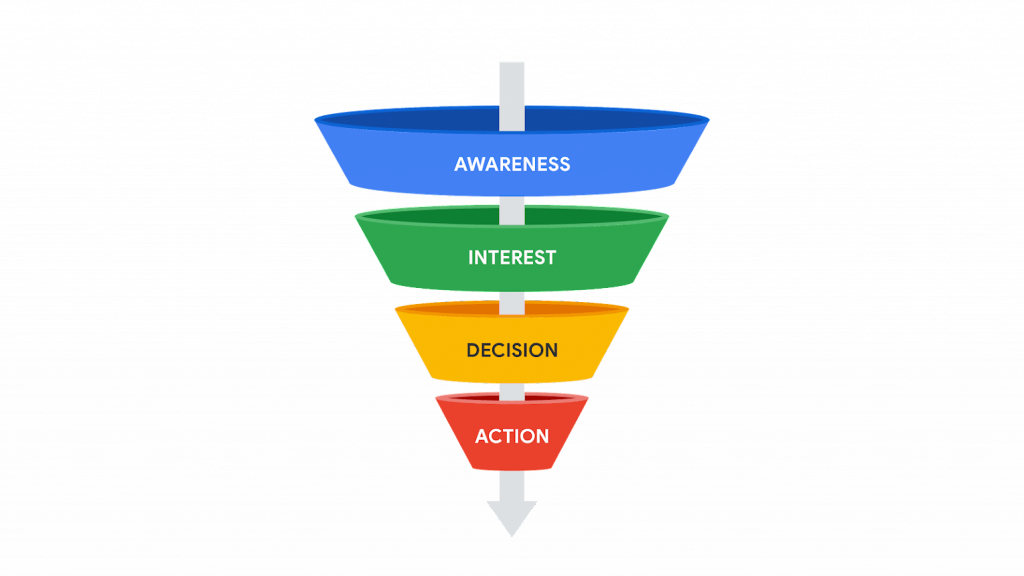
A Marketing funnel is a marketing concept that describes the different stages a potential customer goes through before making a purchase. The Marketing funnel is also known as the sales funnel or purchase funnel, and it consists of several stages, each of which represents a particular point in the customer journey.

Various stages of the Marketing Funnel include:

  1. Awareness: Here at this stage, a potential customer first becomes aware of your product or service.
  2. Interest: At this stage, the potential customer has expressed interest in your product or service
  3. Consideration: This is the stage when the potential customer is seriously considering making a purchase
  4. Purchase: This is the final stage of the sales funnel when the potential customer decides to make a purchase.
  5. Post-purchase: This stage involves engaging with the customer after they have made a purchase to ensure that they are satisfied and encourage them to make additional purchases in the future.

    The goal of this funnel is to guide potential customers through each of these stages, with the ultimate goal of converting them into paying customers. By understanding the different stages of the marketing funnel, businesses can create marketing strategies and tactics that are tailored to each stage and increase their chances of success.

What are Dynamic Websites? Characteristics

Dynamic Websites:

  1. Content:
    • Dynamic websites generate content on the fly, usually pulling data from a database. Content can be personalized based on user interactions.
  2. Development:
    • Built using server-side scripting languages (such as PHP, Python, or Ruby) and a database to dynamically generate content.
  3. Interactivity:
    • Highly interactive. Dynamic websites can respond to user inputs, store user data, and provide a personalized experience.
  4. Performance:
    • May have slightly slower initial loading times compared to static sites due to server-side processing. However, performance can be optimized with proper coding and caching techniques.
  5. Examples:
    • E-commerce sites, social media platforms, content management systems (CMS) like WordPress, and any site with user accounts and data-driven content are often dynamic.
  6. Hosting:
    • Requires a server capable of running server-side scripting languages and managing databases. Typically hosted on more advanced hosting solutions.
  7. Scalability:
    • Can handle a larger volume of content and users more effectively. Dynamic websites are often more scalable as they can adapt to growing demands.

      Summary:

      • Dynamic websites are more complex, offer greater interactivity, and are suitable for sites requiring frequent updates, user interactions, or personalized content.

What are Static websites? Characteristics

Static Websites:

  1. Content:
    • Static websites have fixed content that remains the same for all users. Content is defined by the HTML code written by the developer.
  2. Development:
    • The content is directly coded into HTML files. Each page is a separate HTML file, and any changes require manual editing of the code.
  3. Interactivity:
    • Limited interactivity. Static websites are less interactive as they don’t respond to user input or changes in data.
  4. Performance:
    • Generally faster performance because the content is pre-built and doesn’t rely on server-side processing.
  5. Examples:
    • Brochure websites, personal blogs, portfolio sites, and informational websites are often static.
  6. Hosting:
    • Can be hosted on simple web servers, as they don’t require advanced server-side technologies.
  7. Scalability:
    • May become challenging to manage as the size and complexity of the website grow.

      Summary:

      • Static websites are simpler, faster, and best suited for smaller sites with fixed content.

Comparison of Digital marketing vs Traditional Marketing

Digital marketing and traditional marketing are two distinct approaches to promoting products or services, each with its own set of characteristics and advantages. Here’s a comparison of digital marketing and traditional marketing:

Traditional Marketing:

  1. Tangible Presence:
    • Traditional marketing methods, such as print ads, billboards, and direct mail, offer a tangible presence that can be physically experienced. This can be effective in creating a memorable impression.
  2. Established Credibility:
    • Traditional marketing, especially through established channels like TV and print, can contribute to building brand credibility. Consumers may trust advertisements they see on reputable platforms.
  3. Local Targeting:
    • Traditional marketing methods can be effective for local businesses targeting a specific geographical area. Local newspapers, radio, and community events can be valuable channels.
  4. Less Saturation in Certain Markets:
    • In some industries or local markets, traditional channels may have less competition, providing an opportunity to stand out without being overwhelmed by online noise.
  5. Longer Shelf Life:
    • Print materials, such as brochures or posters, can have a longer lifespan compared to digital content, which may disappear quickly in a fast-paced online environment.
  6. Lack of Interactivity:
    • Traditional marketing often lacks the interactivity and direct engagement that digital platforms offer. It’s more of a one-way communication channel.
  7. Limited Analytics:
    • Measuring the success of traditional marketing campaigns can be more challenging than digital marketing. Analytics are often limited to indirect indicators, such as sales figures.

Digital Marketing:

  1. Cost-Effective:
    • Digital marketing often requires lower upfront costs compared to traditional methods like TV or print advertising. It allows businesses of all sizes to reach a global audience without a massive budget.
  2. Targeted Advertising:
    • Digital marketing platforms provide advanced targeting options, allowing businesses to reach specific demographics, interests, and behaviors. This precision can lead to higher conversion rates.
  3. Real-Time Analytics:
    • Digital marketing offers the advantage of real-time analytics. Marketers can track the performance of their campaigns instantly and make data-driven decisions to optimize results.
  4. Global Reach:
    • With the internet, businesses can reach a global audience. Digital marketing breaks down geographical barriers, enabling companies to target customers around the world.
  5. Interactivity and Engagement:
    • Digital marketing allows for interactive and engaging content. Social media, email campaigns, and online content provide opportunities for direct interaction with the audience.
  6. Flexibility and Adaptability:
    • Digital marketing campaigns can be quickly adjusted based on performance data. Marketers can experiment with different strategies and adapt in real time.
  7. Measurable ROI:
    • Digital marketing efforts are highly measurable. Marketers can track conversions, website traffic, click-through rates, and other key metrics, allowing for a clear understanding of return on investment (ROI).

Ultimately, the choice between digital and traditional marketing depends on the nature of the business, the target audience, and the marketing objectives. Many businesses use a combination of both approaches to leverage the strengths of each.